
Accuracy, consistency, and clear records are part of how public agencies build trust with the people they serve. When your government email approval process runs through disorganized inboxes rather than a structured workflow, it becomes harder to consistently meet a higher standard and support your organization.
Below, we explore how to clean up government email workflows to achieve better control and reduce errors.
Why government email workflows need more structure
Without a clear process in place, small inefficiencies can add up. Here’s where unstructured email workflows tend to create the most friction:
- Productivity loss: When employees spend a lot of time every day searching for attachments or trying to understand long email chains, those minutes pile up into hours of lost work every week.
- Public-facing errors: When feedback is scattered across multiple replies, the wrong version of a press release can go out, or critical legal feedback could get missed entirely, resulting in public corrections and loss of trust with the people you serve.
- Service delays: Workflows that depend on individuals checking their inboxes create bottlenecks. Time-sensitive communications like service alerts could get stuck waiting, leaving residents and community members without clear, timely information.
When disorganization makes compliance harder
A lack of a clear process can also make it harder to meet the compliance and accountability standards government agencies are held to:
- FOIA requests: When your agency receives a Freedom of Information Act (FOIA) request, scattered inboxes can make it difficult to show you’ve provided a complete record, and gaps in documentation are easier to avoid with a structured system in place.
- No audit trail for accountability: Without a centralized system, there’s no way to verify who approved a message after it goes out.
- Federal Records Act alignment: When preserving and keeping track of government records is left to individual employees, inconsistency is hard to avoid. In cases like these, an unstructured government email workflow is a compliance challenge.
Step 1: Remove the process friction from the inside out
Before you can improve the system, you need to understand how it actually works right now. This step is about mapping your current workflow so you can see where things slow down, where decisions get unclear, and where important information falls through the cracks.
Audit your current email workflow
Start by tracing how email requests move through your team. For a handful of recent communications, map every step from initial request to the final send. This might include:
- Who made the request?
- Where was the draft stored?
- Who needed to approve it and in what order?
- How was the final version recorded?
This kind of email audit helps bring to light unclear handoffs between drafting and review, and approval steps that happen inconsistently depending on who’s involved.
Identify your biggest bottlenecks
Once you’ve mapped the workflow, you’ll need to start looking for patterns:
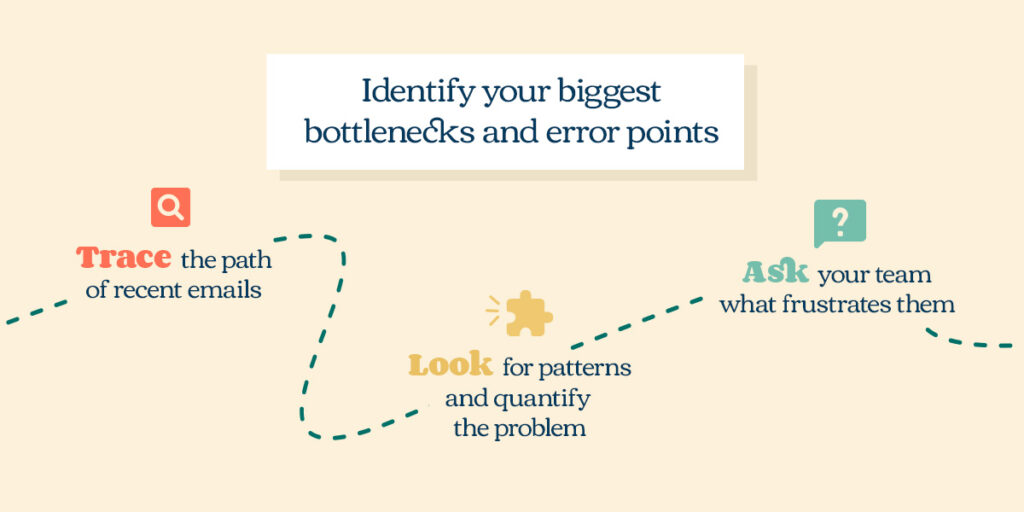
- Trace the path of recent emails: Pick three to five typical communications from the last month and map every step from initial request to final send, noting who requested it, where the draft was stored, how many people approved it, and in what order. This helps you find potentially convoluted paths and unclear handoffs.
- Look for patterns and quantify the problem: Identify where communication consistently stalls and measure it. Track how many follow-up emails it takes to get a single approval and how many days pass between the initial request and final send.
- Ask your team what frustrates them: Find out what part of the process feels like wasted time and what single change would make the biggest difference. The people doing the work every day often know exactly where things slow down and what a single change could fix.
Step 2: Build clearer approval structures
Once you’ve decluttered and identified the bottlenecks, the next step is to replace those ad hoc email chains with structured workflows that provide visibility and accountability.
Establish a centralized submission and routing process
The key to ending inbox bottlenecks is creating a single entry point for all email requests.
A centralized intake system ensures that:
- No request gets lost in a cluttered inbox or forgotten when someone is out of the office.
- Managers get a real-time view of the team’s entire workload without having to check in with every team member.
- Requesters provide complete information up front through a standardized form, including target audience, desired send date, key message, and relevant links, so that back-and-forth clarification emails aren’t necessary.
Once requests come through a central point, the system can automatically route requests to the appropriate team member or approval queue based on request type or submitting department, eliminating the need for manual delegation.
Create visibility and accountability systems
The confusion of email approval chains disappears when stakeholders can see status, leave comments, and provide sign-off in one place. An approvals dashboard shows real-time status at a glance, so everyone knows whether a project is in the drafting stage, pending legal review, or fully approved and ready to send.
An approval dashboard also streamlines feedback, making the review process much smoother. Rather than navigating fragmented email chains with multiple versions, a dashboard allows all approvers to comment directly on the most current draft. This fosters clear communication, ensures everyone is working from the same page, and builds a single, consolidated revision history.
In addition, a dashboard replaces ambiguous email approval with a formal, auditable sign-off. Instead of a vague “looks good” buried in a thread, each stakeholder clicks “Approve” or “Reject,” and that action is time-stamped and logged permanently.
Implement parallel processing and escalation rules
Not every approval needs to happen in sequence. For example, if legal review and brand review don’t depend on each other’s input, they can happen at the same time. With this in mind, identify which stages of your approval workflow are sequential and which can run simultaneously, then configure your system accordingly.
Escalation rules address approvals that sit untouched. Set automatic triggers so that if an approver hasn’t responded within a defined window, the request gets bumped to a backup or escalated to a supervisor. This keeps work moving without requiring someone to manually follow up, and it creates clearer expectations around response times.
Step 3: Make your communications compliant by design
The final step in cleaning up government email workflows focuses on building compliance into the workflow itself, so your team doesn’t have to think about it as a separate layer on top of everything else.
Build audit trails you can rely on
A dedicated platform automatically logs every action from initial request through final send, creating an unalterable record of who drafted, commented, approved, and delivered every message. No more reconstructing decisions from incomplete email threads.
When an audit or records request comes in, you can produce documentation showing which stakeholders signed off and when. In an audit or legal review, this kind of repeatable, enforceable process is far more compelling than presenting scattered email chains and asking auditors to trust that proper process was followed.
Ensure your process aligns with federal email records requirements
A structured workflow makes compliance a feature of the system rather than a responsibility that falls on individual employees:
- Automate retention by design: Expecting every employee to be an expert on Federal Records Act retention schedules is unrealistic. A structured workflow automates government email records retention by capturing final versions, approval histories, and send records according to policy, shifting the primary responsibility from the person to the process.
- Enforce consistent policy across the agency: A centralized platform enforces a single, consistent policy for categorizing and retaining communications, ensuring your agency follows its own data governance rules and remains audit-ready.
- Demonstrate security commitment with independent certification: Choosing a platform that has undergone rigorous, independent security reviews demonstrates your commitment to protecting public data. High-level certifications like TX-RAMP certification serve as external proof that your technology foundation is secure, adding significant credibility in compliance conversations with auditors or legal teams.
Create safer and more trusted government communications with Emma
The shift from scattered email threads to structured workflows is ultimately about serving your community better. When your team spends less time hunting down approvals and more time crafting clear messages, the people you serve receive timely, accurate information they can trust.
Emma provides the approval workflows, locked templates, and audit trails you need for public sector email management, with the security and compliance your agency requires.