Save time and inspire engagement with marketing automation

When a subscriber signs up, clicks, or makes a purchase, Emma sends the right follow-up automatically. Set it up once and let it run, so your team can focus on strategy instead of sending.

flexible-image
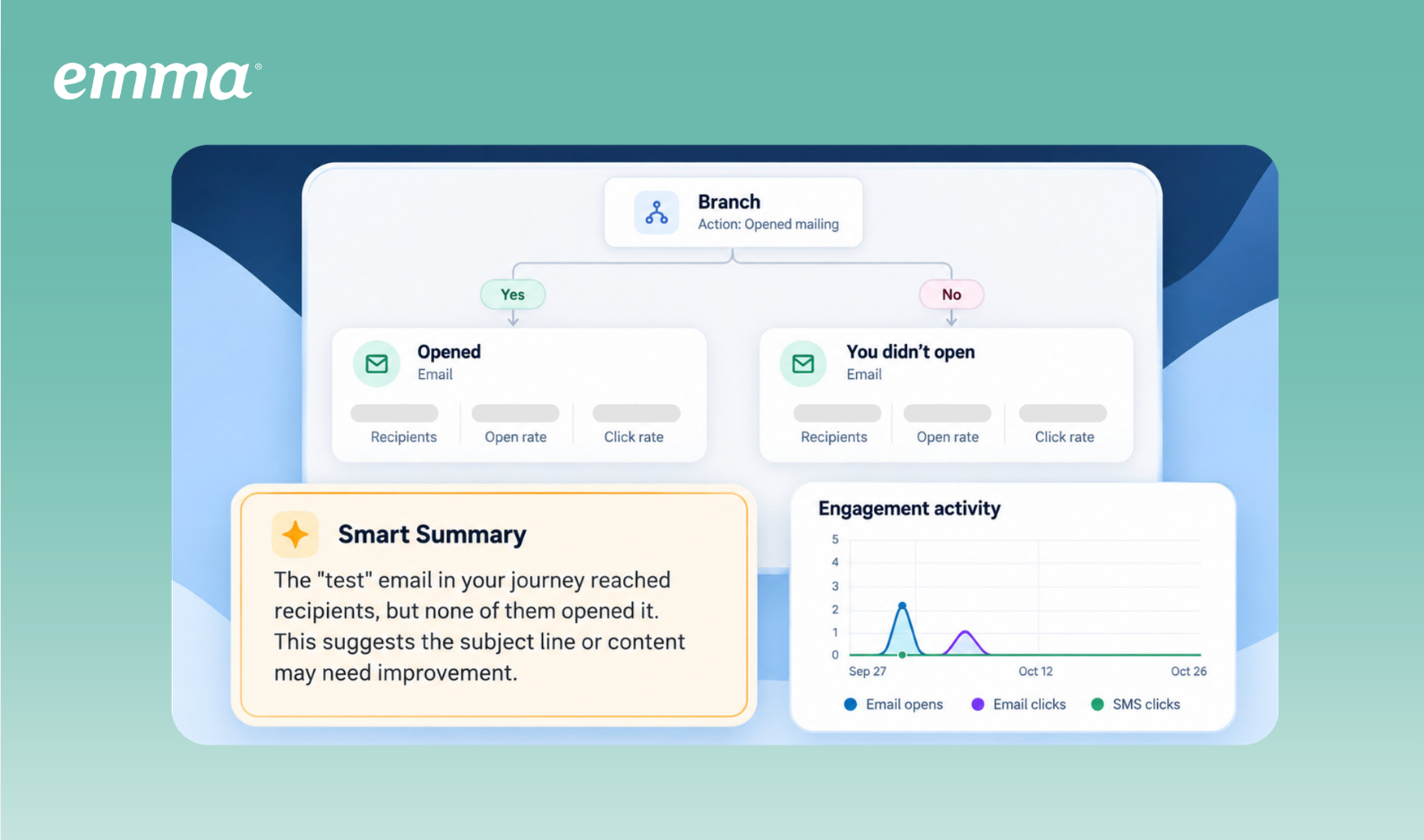
Emma interface showing Custom Journeys, Journeys Reporting, and Smart Summary features.

See how it works

The not-so-complicated way to send personalized messages at the perfect moment

Welcome new subscribers with a friendly hello, re-engage last year’s donors, or gradually get incoming students up to speed one manageable message at a time. Emma’s marketing automation tools let you consistently engage your audience based on how they engage or where they are in their relationship with your organization.

Plan automated welcome sequences, drip campaigns, and personalized journeys in Emma, then let Emma handle the scheduled sends. Your subscribers get timely, tailored communications, and you’re free to do literally anything else.

Product features

Build, track, and improve your automated email and SMS campaigns in one place

Personalize for all of your audiences

Build journeys around audience segments and engagement, with flexible branching that lets your team manage detailed, relevant campaigns within one workflow.

Combine the power of email and SMS

Pair emails with timely text reminders in one journey, giving subscribers another opportunity to engage with your campaign.

Optimize with clear recommendations

Review results beside each campaign and path, with recommendations to help you address engagement drop-offs and improve upcoming sends.

Minimize manual sends

Get your campaign communications squared away in advance. With Drip Campaigns, you choose the messages and timing, and Emma takes care of the scheduled sends.

Colleagues-collaborating-in-bright-daylight

Keep each audience interested from one message to the next with Custom Journeys

Create more relevant experiences by giving each contact a next step based on who they are and how they engage. 

Rather than sending your audience the same message in the same order, Custom Journeys let you create highly personalized paths that are tailored to specific audiences and triggered by contact behavior. Build in Wait steps to pace your communications how you see fit, so you don’t have to constantly decide when’s the right time to send someone their next message.

And since contacts will naturally engage in all different ways, it’s easy to build in several possible paths from a single point with unlimited branching. That means less ongoing manual work for your team, more timely and relevant communications for everyone in your orbit, and more ways to keep engagement going. (Win, win, win.)

Custom Journeys are available with Teams and Corporate plans.

2023_EM_campaigns_sms_blog_01-sms-to-future-proof_graphic_01-1

Reach your audience where they engage with multi-channel customer journeys

Connect with your contacts in the places they’re most likely to interact with your content—email, SMS, or a bit of both.

Use email for the details that help people make a decision, and SMS for a brief prompt that makes their next step clear. Emma’s Custom Journeys are designed so the two can work hand in hand, reaching people in the channels that suit them at different moments.

With both channels in one multi-touch journey, you can plan how the messages fit together and coordinate the timing between them. Each send has a purpose in the campaign, with your team managing email and SMS as one connected sequence.

SMS is a paid add-on for Teams and Corporate plans.

Explore Emma SMS

Keep tabs on performance with Journey Reporting

See performance beside the campaigns and paths that produced it, saving you the trouble of piecing the journey together from separate reports. Look at the whole customer journey flow from a birdseye view to spot engagement trends, or get granular by zooming into a single contact to see exactly where they dropped off.

Optimize with Smart Summary’s marketing intelligence

Get a helping hand in identifying meaningful trends and areas for improvement with personalized, plain-language takeaways at journey, path, and contact level. Smart Summary takes care of the analysis for you, so you can get straight to deciding which recommendations to implement.


Everyday examples

Custom Journeys in action

Practical examples? We love those too. Get a glimpse into how Custom Journeys work in just a handful of the industries Emma serves to see what’s possible for your own marketing.

A university creates an enrollment journey for prospective students and uses segments and engagement behavior to personalize the experience. Students can follow different paths based on program or audience group, while those who click a financial aid or campus-life link can receive relevant follow-up communications. The marketing team can then compare path-level performance to understand which messages and topics are driving engagement and identify opportunities to improve the journey.

A nonprofit can send a fundraising appeal, use a Wait step to give donors time to respond, and then branch contacts based on their engagement. Contacts who have already engaged can receive different follow-up messaging, while those who have not can continue through a reminder path. Journey Reporting allows the organization to compare performance across those paths and understand which messages and engagement strategies are most effective.

Your fitness studio announces a training program by email, then sends a text reminder. After a few days, members who clicked the text receive coaching details followed by an enrollment reminder. Those who haven’t clicked receive a member’s success story to inspire them to take action, then an invitation to try an introductory session.

Your city introduces its youth programs by email, then shares further details with residents on the specific activities they clicked to explore. A few days later, those who clicked a registration link can receive a deadline reminder—those who still don’t register get a well-timed text as an extra nudge. Those who engaged with the initial email but never clicked on the registration link get more information about what taking part involves, or a preview of similar youth programs coming next season.

A hotel chain invites past guests back with a seasonal stay offer. After a few days, guests who clicked to explore it receive package details and a link to book. Those who haven’t clicked receive an email showcasing the destinations included in the offer, followed by a text reminder before it expires. The marketing team can compare engagement across both paths, identify where interest drops, and adjust future messages within the same journey.

pexels-roberto-hund-5358100

Make space in your day with Drip Campaigns

Get a head start on the communications you know you’ll need. Set up a welcome series for new members, share enrollment information with prospective students, or plan invitations and reminders for a fundraising event. Emma sends your Drip Campaign on the schedule you’ve chosen, making space for campaign planning and improvement.

You set the pace, too. Leave a few days between messages to give people time to take each one in, or schedule a final reminder close to an event or application deadline. Your emails and texts can build on one another, with the full sequence planned before the first message goes out.

Customer story

Drip Campaigns in real life

Stewart360 uses Emma to schedule 16-week enrollment campaigns across colleges and universities, with messages matched to student interests. The result? Higher open and click rates than the platforms they used before Emma. 

Read the Stewart360 story

15%

higher open rates

2-3x

higher click rates

Email automation FAQs

Email marketing automation lets you send the right message to the right person at the right time—without you having to press send. Set up your workflows once based on what your subscribers do (or when you want to reach them), and the platform takes it from there. With Emma, you can build journeys that respond to your audience. For example, someone clicks a link about a specific product, and automation follows up with more on that topic.

Triggers in Emma fall into a few categories.

  • Signup actions are common. When someone joins your list or updates their preferences, Emma can send a welcome series of emails right away.
  • Behavioral triggers track what people do with your emails and on your site. Clicks, opens, purchases, page visits—any of these can kick off an automation.
  • Date-based triggers handle recurring tasks like birthdays and renewal reminders.
  • Emma also integrates with your CRM and core systems so subscriber data flows in automatically, and every email reflects what you know about the people receiving it.

The automation builder lets you layer triggers with conditions and build branches based on what people do next.

Emma supports welcome emails, drip campaigns, re-engagement emails, and multi-touch journeys for communications such as enrollment campaigns or membership reminders. Your team can plan a sequence in advance or create personalized journeys with different paths for audience segments and engagement.

A lead nurturing series is a set of emails that guides people from “just browsing” to “ready to act”—whether that means buying something, signing up for an event, or staying engaged with your organization. Unlike one-off campaigns, these series unfold over time, building trust with each message.

Most nurture series mix education, social proof, and calls to action. Emma’s tools let you adjust the path based on what people do. If someone clicks to learn more about a topic, the next email digs deeper. That flexibility helps you stay relevant without overwhelming anyone. Nurture series also work really well when people need time to decide—you stay top of mind without your team having to track every step manually.

Custom Journeys lets you build several paths from one decision point using segments, email opens, email clicks on any or a specific link, and SMS clicks. You can add branches within branches, with no set cap on steps or depth. Your team controls when engagement is evaluated and which qualifying paths contacts follow.

Smart Summary interprets journey performance data and recommends opportunities to improve. It provides takeaways at journey, path, and contact level, helping your team identify trends and potential drop-offs without starting the analysis from raw metrics. Summaries update daily and can be refreshed on demand.

Yes. You can move from reporting to the builder, edit an active journey, and publish changes for future scheduled sends. Your team chooses how to apply the insights and recommendations.

See what your organization can do with marketing automation


Create timely, relevant communications for the people you reach, with the flexibility to account for different audiences. Emma handles your scheduled sends and offers clear recommendations for improvement, giving your team a dependable way to carry out detailed campaigns and build on what you learn.